Data loaders
As emphasized in Data format section, different
experimental setups return different file formats. To handle those
discrepancies, data_loaders module implements
objects that take care of a proper data extraction and returns
data_loaders.Dataset, recognizable by the rest of the package.
It provides the Dataloader class as a base structure
for different sources (beamlines, electron analyzers, labs) and a number of
specific Dataloader dedicated to various ARPES beamlines around the world
(full list is shown in a table below).
Principles of the data import in piva are presented on a simple scheme
below.

If the file format is not yet supported, one needs to implement a custom
Dataloader and make it accessible for piva. Detailed guidelines on
how to do it can be found in section
“Writing custom Dataloader”.
Implemented Dataloaders
Table below shows list of Dataloader corresponding to light sources and
data formats currently implemented within piva, along with the most
recent dates when the Dataloader was tested.
Dataloader |
Facility |
Date |
File formats |
Comments |
|---|---|---|---|---|
– |
Oct 2023 |
|
files saved with |
|
SLS |
Oct 2023 |
|
– |
|
SLS |
Aug 2023 |
|
– |
|
MAX IV |
Oct 2023 |
|
– |
|
ALS |
Apr 2023 |
|
– |
|
Diamond |
Nov 2022 |
|
– |
|
Solaris |
Apr 2023 |
|
– |
|
Soleil |
Oct 2023 |
|
– |
Writing a custom Dataloader
In order to implement custom Dataloader one needs to:
write a loading script,
make it available for
piva.
Description below shows step by step how to achieve both.
A
pivadataloader is nothing else than a subclass ofDataloaderthat takes care of three things:Reading an ARPES data file.
Extracting all relevant data and metadata from loaded file.
Creating
Datasetobject and filling it with so extracted data.
The
Dataloaderclass offers an interface for that. In order to write a custom dataloader, let’s call itCustomDataloader, one needs to start by creating a subclass ofDataloader:from piva.data_loaders import Dataloader class CustomDataloader(Dataloader): name = 'Custom1' def __init__(self): super(CustomDataloader1, self).__init__()
As an abstract base class,
Dataloaderrequires aload_data()method. Any custom subclass must therefore implement this method and assign aDatasetobject to theself.dsattribute:def load_data(self, filename, metadata=False): # <Your code here> # 1) Read in data from *filename* # 2) Extract necessary (meta)data # 3) Put it into an argparse.Namespace and return it return self.ds
See also
See
load_custom_data_loaders()for more details.Making CustomDataloader visible for
pivais accomplished throughDataloaderImporterobject. Its proper configuration requires following conditions:The module (python file) in which
DataloaderImporteris defined must be calledpiva_dataloader_importer.py.Path to the
piva_dataloader_importer.pyneeds to be added to the$PYTHONPATHof your virtual environment. A simple guide on how to do it on any operating system can be found here.
At the beginning of the session,
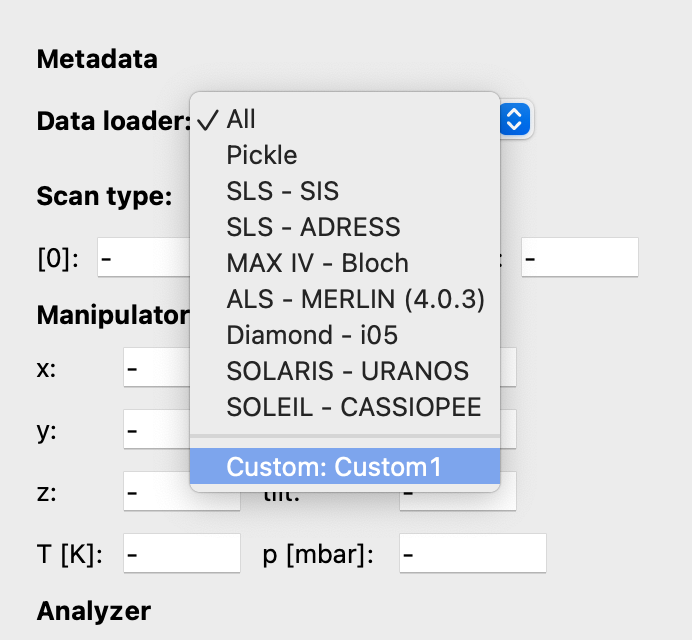
pivawill search for theDataloaderImporterclass and execute whatever code it contains. Correctly loaded CustomDataloader should appear in DataBrowser’s drop-down menu:
Note
The advantage of this approach is that the piva_dataloader_importer.py
module and CustomDataloaders can be stored in any directory, without
modifying the piva package. Moreover, once correctly implemented,
the loader will be automatically imported at the beginning of each
piva session and available to the user immediately.
Note
It is highly recommended to use the prepared templates for both
DataloaderImporter and CustomDataloader, which can be
found
here.
Example
Users are free to implement custom data loaders according to their
preferences. However, they may find the provided template
here helpful.
The template offers a basic implementation of the DataloaderImporter
and CustomDataloader classes.
Additionally, the template can be used to test the configuration with an
example spectrum file, which
contains a simulated 2D spectrum:

Contributing
We encourage everyone to share their tested, self-written data loaders with
the community by adding them to piva’s source code. This can be done
ideally directly through GitHub or
alternatively by contacting the development team: